The start menu in Windows XP and Vista have only basic functionality or rather it can be said as plain. Vista Start Menu is a good alternative to the plain start menu in XP and Vista. The best part of Vista Start Menu is that it does not change your system settings, thus making it easy to install, as well as simple to remove. The Vista Start Menu is designed such that all the items in menu are quickly accessible.
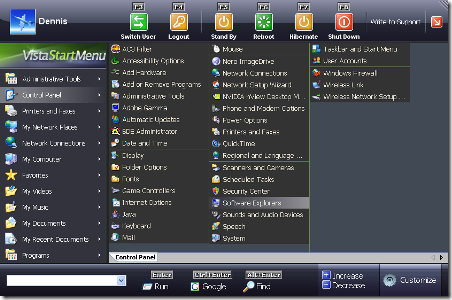
Features of Vista Start Menu;
- Programs are easy to find because they are exactly where you left them. Programs do not change the positions and when a program is uninstalled, then the space is left blank.
- There are different screen resolutions, like very large or very small.
- You can resize the start menu just like any other program.
- Command line prompt is easily accessible.
- It also features a built in search (both PC and Internet).
- Vista Start Menu has multiple tabs, so that you can arrange programs.
- It has conveniently placed power buttons to shut down or restart computer.
Vista Start Menu is a great utility for customizing start menu especially for the fact that it does not change any Windows settings and can be configured easily.
Supported Platforms:
Windows NT
Windows 2000
Windows 2003
Windows XP
Windows Vista
0 comments:
Post a Comment