1. Right click on Sidebar and in the option select Close Sidebar,

2. Right click on sidebar and select properties in the options.

In the properties options, uncheck “Start Sidebar when Windows Starts” option. Next time when Windows starts, sidebar will not be loaded.

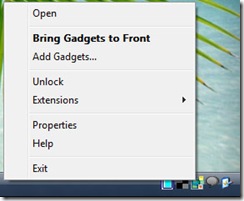
3. Right click on the sidebar icon on the taskbar and select Exit.
Apart from these, you can change the start up of sidebar in msconfig file.
0 comments:
Post a Comment