Whenever you compose posts for your blogs, you will need pictures to illustrate it and the most common method of taking screenshot is the ALT + Print screen command. There are many freewares to do the job. Vista has an in-build snipping tool to take screen shots. This feature in Vista might be turned off in some PC and Laptops, but you can activate it to take screen shots.
This program belongs to the tablet PC functions of Vista. You will need Administrator rights to enable this feature. Open Control Panel and select ‘Programs’ and ‘Program and Features’.

Click on ‘Turn Windows functions on or off’ and you can see various setting which can be turned on or off. Now select the check box beside Tablet PC optional Components.

To Open this tool, click start menu and type snipping and press enter. When this is opened for first time, it will ask you whether it should add the tool in the quick start.
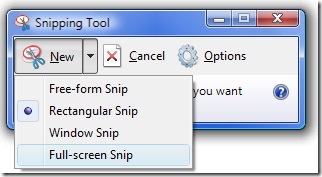
This tool has pretty good options as well, it offers free form, rectangular, Windows and full screen snip. There is also provision to select the background color. Once you snip the screenshot you can save it in graphic formats like JPEG.
This utility is available only in Vista Home Premium and Ultimate versions.
0 comments:
Post a Comment